Photograph a slide or upload the lecture file, and your cards are ready in about a minute. Not a ready-made deck for someone else’s syllabus — yours, in your professor’s wording, covering what your exam will actually ask.
Works on phone and laptop · Add it to your home screen like an app
Write the cards by hand and you lose an hour before you start. Download a ready-made deck and it belongs to another university’s course. FigoFlash solves both.
You set your AI assistant up once. After that it’s two steps per lecture, and the app keeps track of the rest.
Create a project in ChatGPT or Claude and paste in the FigoFlash instructions — one tap copies them from inside the app. From then on your assistant knows exactly how to write your cards: direct questions, no padding, and nothing that wasn’t in your lecture.
A photo of a slide, a PDF file, or text you paste. Ask for as many cards as you want. Copy the reply into FigoFlash and every card appears for you to check and edit before anything is saved.
Read the question, try to recall the answer, then reveal it. Press Easy and the card is done. Press Again and it returns later in the same session — until you genuinely know it.
How many cards you’ve finished, how many are left, and in which subject. And to start over before an exam, one button marks everything unread again — without losing a single card.
No algorithms, no scheduling tables. You decide what you know and what you don’t, and the session doesn’t end until every card is done.
Couldn’t recall it? It returns later in the same session — never straight after itself, so you learn the fact rather than the order.
Recalled it? It leaves the session and counts as read. You won’t see it again until you reset.
Built for long study sessions: calm, fast and clear.
An image, a PDF or text from your lecture becomes cards in your professor’s terms and figures.
Semester → subject → lecture. Study one lecture on its own, or mix several subjects in a single session.
Star the difficult ones as you study, then revise those on their own before the exam.
How much you’ve finished and how much is left, subject by subject. Plain numbers, no busy charts.
Select cards and send them to a friend in one tap. They paste them in and the cards are theirs.
Add it to your home screen and it opens as its own app — its own icon, its own name, and instant.
Start with a free seven-day trial — no card, no commitment. You sign up yourself and study straight away. When the trial ends, pick a plan and message us to activate it.
Both plans include everything on this page — there is no cut-down tier. Payment and activation are arranged over WhatsApp; the app itself never asks for card details.
Usually not. The free tier handles text and images in most cases. If your lectures are large PDFs, or you upload a lot in one day, you may reach the free limits — that’s when a subscription helps, or simply splitting the lecture into parts.
Yes. Every student has their own account, and nobody can see anyone else’s cards. Sharing happens only when you pick cards and send them yourself.
Yes, and there is nothing to download from an app store. Open flash.drfigo.com in Safari on iPhone and add it to your Home Screen in six taps:
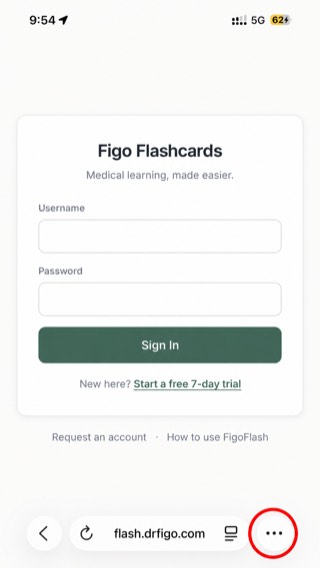
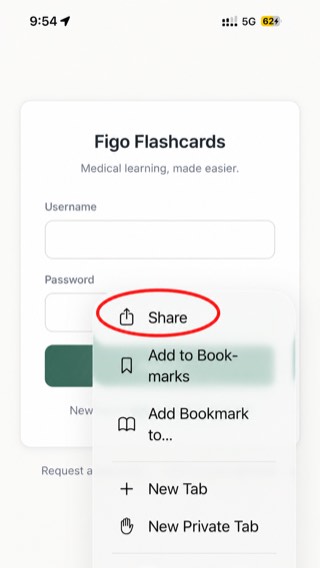
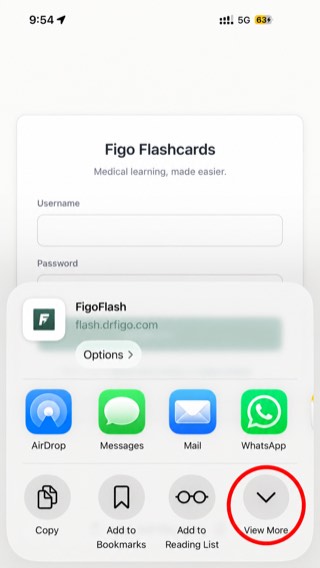
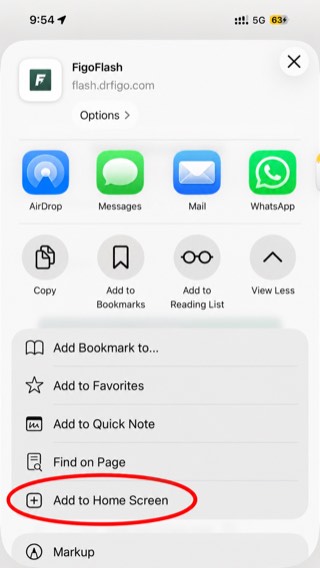
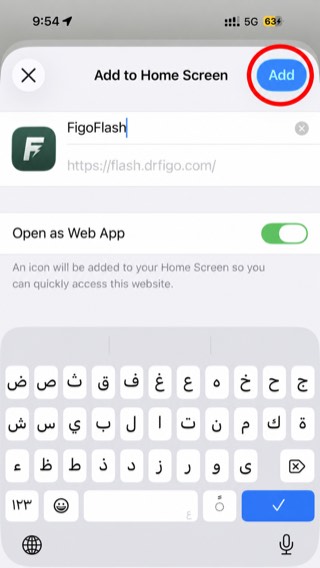
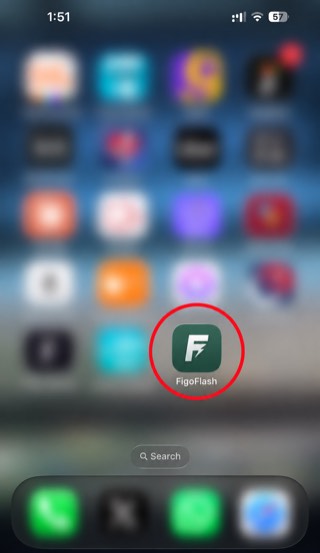
From then on it opens full screen with its own icon, like any other app — and it keeps you signed in. On Android, open the same link in Chrome and choose Install app from the ⋮ menu.
There’s no limit on your total. The only limit is 500 cards per paste, which is far more than a single lecture.
Not a problem — send the image to your assistant and it reads it. And if part of it isn’t clear, the instructions require it to tell you rather than guess.
Yes. Every tap is saved on your device first and then sent to the server, so even if you close the tab or lose your connection mid-session, your answers aren’t lost.
Yes, at any time — the question, the answer and where it sits. Editing doesn’t remove the card’s star, nor undo the fact that you finished it.
Yes. The reset button marks all of your cards unread again. Your cards and your starred ones stay exactly as they are — nothing is deleted.
The language of your lecture. If the lecture is in English, the cards are in English with its terminology untouched — which is what you’ll be examined on.
Sign up yourself on the platform in about a minute: your name, your WhatsApp number, a username and a password — and a free seven-day trial begins. After that, message us on WhatsApp to extend it.
 FigoFlash